Shortcut:
- RS:TM

Tile markers are custom annotations that can be placed on specific tiles in-game to aid with various content.
Using tile markers
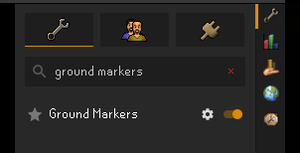
Tile markers can be accessed using RuneLite by enabling the Ground Markers plugin.
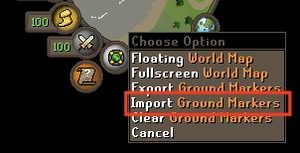
After copying the tiles from an article on the wiki, right-click the World Map orb by the minimap and select Import Ground Markers to enable them in-game. Importing will check your system clipboard for a ground marker import string. Exporting will copy the ground markers in the area around you to the system clipboard.
You may also paste tile markers on the RuneLite website to view them in-browser instead of in-game.
Adding new tile markers to the wiki
- Create new subpage of Tile markers:
Note: This must end in.json - Export the tile string from RuneLite and save it to the new page.
- Add
{{Tile markers box|Module:Tile markers/Example page.json}}to the article. - If you find that this isn't working, please join the RuneScape Wikis Discord and ping
@andmcadamsor@ribletwith a link to the page you created. For admins, use Special:ChangeContentModel to change the content model to JSON.
See also
- List of tile markers uploaded to the Wiki
- Ground Markers plugin